Master Your Workflow: MostLogin’s New Tagging System
Categorize, Filter, and Manage Hundreds of Profiles with Ease.
Managing a massive farm of browser profiles and cloud phone environments requires absolute precision. To help you stay organized and move faster, we are excited to introduce the Advanced Tagging & Filtering System in the latest MostLogin update.
1. Create Custom Tags
Build your own organizational logic. Whether you want to group profiles by social platform (Facebook, TikTok, X), account status (Warm-up, Active, Banned), or specific projects, our new "Add Tag" feature lets you label your assets exactly how you want.
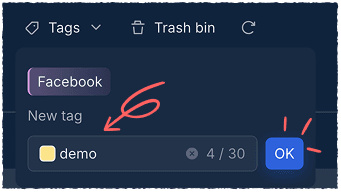
- Supports custom naming and color-coded labels.
- Paid subscriptions can add up to 50 tags
2. Multi-Tag Association
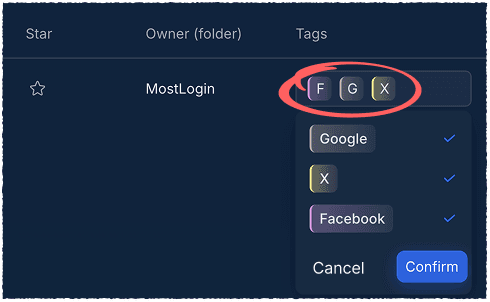
You can now "stick" multiple tags onto a single browser profile or cloud phone environment. This allows for granular tracking—for example, a profile can be tagged as both "Google" and "Client A" simultaneously.
3. Instant Tag Filtering
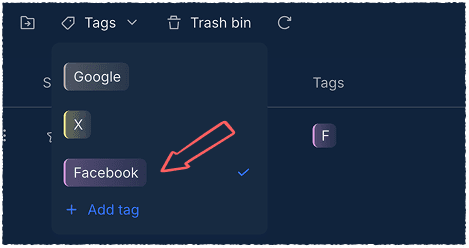
Stop scrolling and start doing. Our powerful new Smart Filter allows you to isolate specific profiles in seconds. Just click the "Tags" dropdown, select your category, and MostLogin will hide everything else, showing only what you need to work on right now.
Why Use Tagging?
The MostLogin Anti-detection Browser tool helps users solve high-frequency problems such as multi-account operation, environment isolation, and account risk control.
For operation questions, please refer to the Official Help Documentation