If you're still managing five, ten, or more Instagram accounts simultaneously in 2026, chances are you've noticed that Instagram's detection mechanisms have become far more robust than before. Previously, you only needed to solve the problem of logging into multiple accounts on a single computer, but now you also have to address security issues related to multi-account marketing.
Some Instagram accounts get banned outright during operation for no apparent reason, and typically several accounts are banned at once. Many people don't even know the cause. Today, we'll explain how to safely manage multiple Instagram accounts in 2026.

1. Why is it Easy to Get Banned for Managing Multiple Instagram Accounts Now?
Instagram's risk control mechanisms have shifted from verifying whether a single account belongs to a real person to checking if multiple accounts are operated by the same individual. Moreover, it's no longer as simple as just checking IP and device information; instead, it uses a comprehensive judgment system:
For example, what device fingerprint you're using
Whether your operation rhythm and habits are similar
Whether multiple accounts are active in the same environment
Therefore, many accounts are banned not because of any violations you committed, but because the browser environment has exposed the connection between your multiple accounts.
2. Why Have Many Traditional Methods Become Ineffective?
1. Incognito Mode
Many people still use incognito mode, but although this method can clear cookies, the overall browser fingerprint remains unchanged. Things like Canvas, WebGL, fonts, and resolution cannot be cleared by incognito mode.
So from Instagram's perspective, your multiple accounts are still on the same device, leading to account association and mass bans.
2. Using Only VPN
While a VPN changes your IP address, information such as device fingerprint and behavioral patterns still remains. Frequent IP address changes will only make you more likely to be targeted by the platform, resulting in account association and bans.
3. Purchasing Multiple Devices
This was previously the most cumbersome but safest method, yet it has obvious drawbacks: high costs and easy management chaos. It's basically impossible to scale up to 20, 50, or 100 accounts.
3. How Does Instagram Detect Associated Accounts Now?
Instagram now uses multi-dimensional verification:
Browser Fingerprint: Canvas/WebGL/Fonts/UA
Device Consistency: Same computer, same system characteristics
Behavioral Similarity: Login time, operation frequency, click path
IP + Time Pattern: Whether multiple accounts share the same network environment for a long time
If several of these factors overlap across multiple accounts, they are likely to be noticed and associated.
4. What Do You Need to Do to Safely Manage Multiple Instagram Accounts?
An independent browser environment: Complete cookie isolation, independent LocalStorage/SessionStorage, making it feel like you're using different computers.
A unique browser fingerprint: Including but not limited to Canvas/WebGL, font combinations, resolution, and User-Agent. It should not be randomly changed frequently but remain relatively stable and realistic over the long term.
A long-term bound proxy identity: IP should not jump randomly, with consistent region and operation logic. A long-term network environment like that of a real user is optimal.
5. How to Safely Manage Multiple Instagram Accounts in 2026
We recommend using the MostLogin Anti-Detect Browser to set up independent environments for multiple Instagram accounts. MostLogin Anti-Detect Browser supports manual fine-grained configuration of browser fingerprints, browser environments, and proxy binding settings—all of which are crucial for managing multiple Instagram accounts.
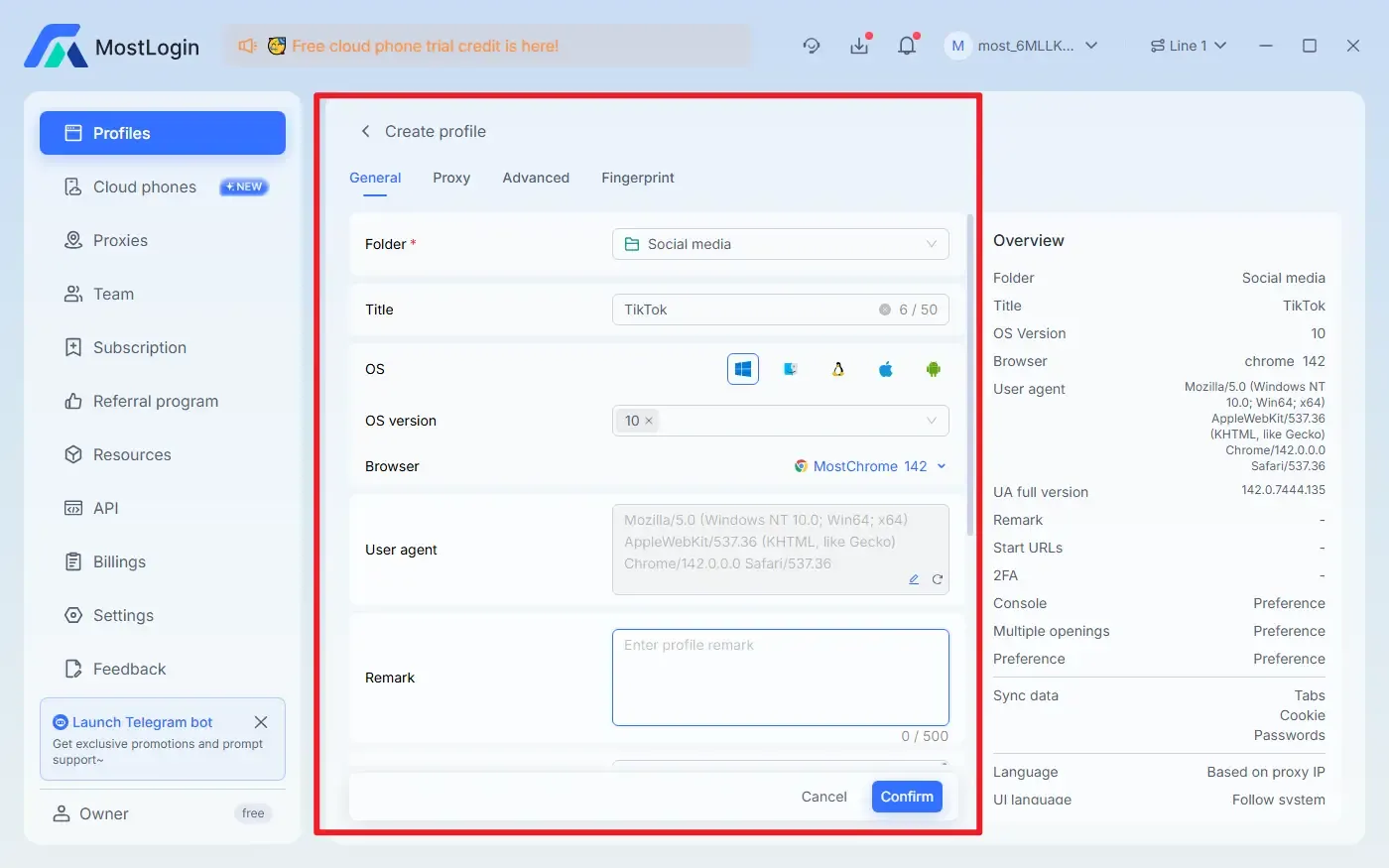
When creating independent browser environments, configure information such as operating system, browser, user agent settings, cookies, language, user interface, location, hardware, and WEBRTC. Create multiple environments and assign them to your various accounts—this way, Instagram's official browser fingerprint detection mechanisms won't be able to link your multiple accounts.
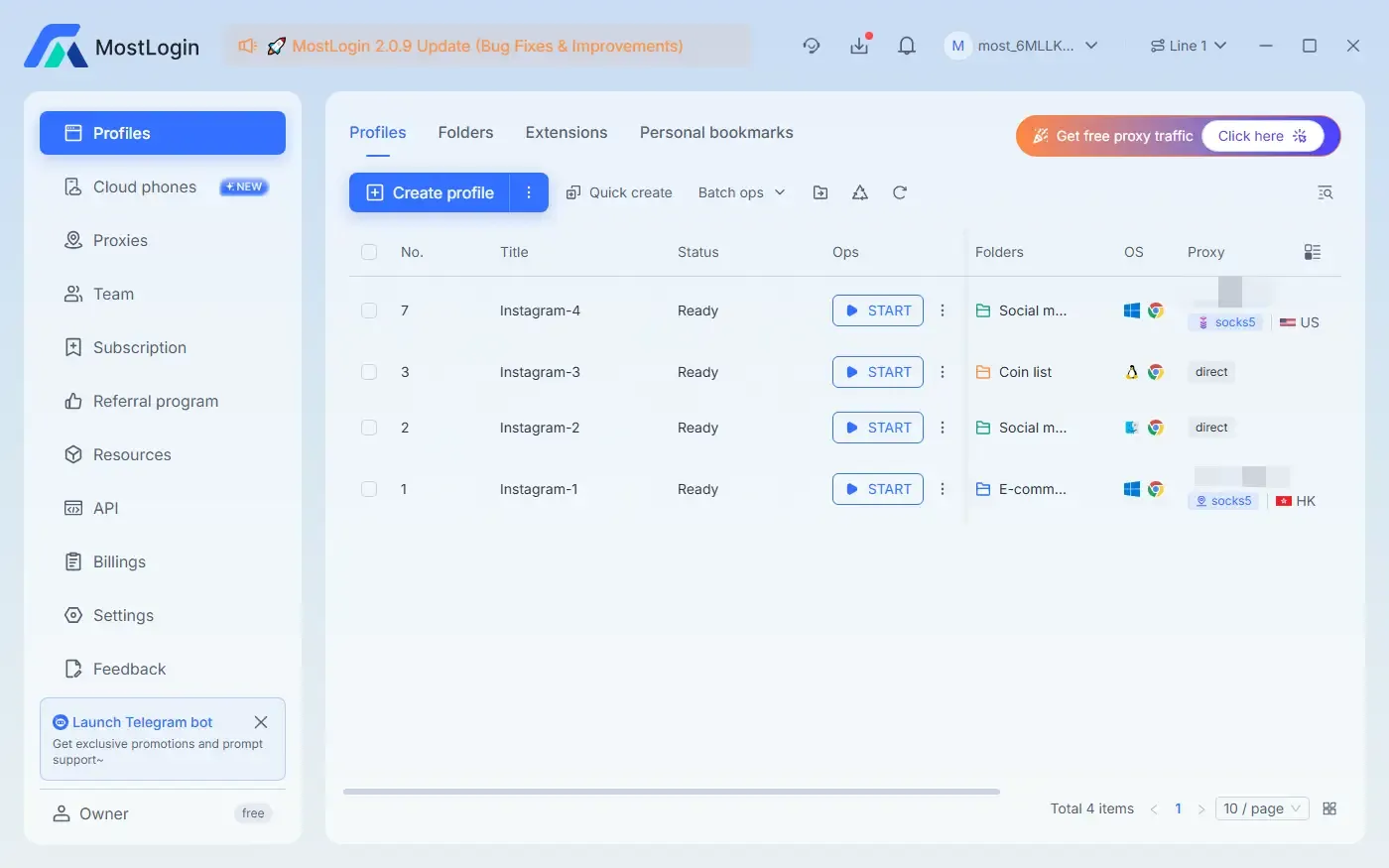
6. What Features Does the MostLogin Anti-Detect Browser Offer?
Reduce Risk Control and Account Ban Probability: Fixed and realistic browser fingerprints can reduce issues such as abnormal logins, identity verification, and risk control reviews, improving account stability.
Prevent Account Association: Each Instagram account runs in an independent browser fingerprint environment, avoiding being identified as the same user by the system due to consistent device, Canvas, WebGL, font, and other information.
Support Multi-Account Matrix Operation: Manage multiple accounts on a single device, with each account operating as if on a different real device—ideal for large-scale marketing and team collaboration.
Improve Long-Term Account Trust: A stable, consistent, and reasonable operating environment helps build account weight and enhance account trustworthiness.
Simulate Real Regional Users with Proxies: The fingerprint browser can bind an independent proxy IP to each account, keeping the account's region, network, and device environment consistent, making it more like a real person is operating.
7. How Do Different Anti-Detect Browsers Compare for Instagram Management?
Several anti-detect browsers now offer environment isolation for multi-account Instagram management. Here's how the main options stack up:
| Feature | MostLogin | Multilogin | BitBrowser |
|---|---|---|---|
Browser fingerprint isolation
| ✅ Full | ✅ Full | ✅ Full |
| Proxy binding per profile | ✅ Yes | ✅ Yes | ✅ Yes |
| Cloud phone support | ✅ Yes | ✅ Yes | ✅ Yes |
| Free tier / trial | ✅ Free plan available | ❌ Starts at $2 trial | ✅ 10 free profiles |
| Pricing (entry level) | 💲 Budget-friendly | 💲💲💲 Premium | 💲 Budget-friendly |
| Team collaboration | ✅ Yes | ✅ Yes | ✅ Yes |
| Best for | All-round multi-account management | Enterprise / cloud phone users | Beginners on a budget |
Here are the two tables in clean, Strapi-friendly markdown — ready to paste directly into the rich text editor:
Table:
| Feature | MostLogin | Multilogin | BitBrowser |
|---|---|---|---|
| Browser fingerprint isolation | ✅ Full | ✅ Full | ✅ Full |
| Proxy binding per profile | ✅ Yes | ✅ Yes | ✅ Yes |
| Cloud phone support | ✅ Yes | ✅ Yes | ❌ No |
| Free tier / trial | ✅ Free plan available | ❌ Starts at $2 trial | ✅ 10 free profiles |
| Pricing (entry level) | 💲 Budget-friendly | 💲💲💲 Premium | 💲 Budget-friendly |
| Team collaboration | ✅ Yes | ✅ Yes | ✅ Yes |
| Best for | All-round multi-account management | Enterprise / cloud phone users | Beginners on a budget |
MostLogin offers fine-grained fingerprint configuration — Canvas, WebGL, fonts, User-Agent, timezone, and proxy binding — in an interface that doesn't require technical expertise. It covers everything most Instagram multi-account users need, from solo operators to scaling agencies, at a price point that makes sense when managing dozens or hundreds of profiles.
Multilogin is the more established name, with cloud phone infrastructure for native-app Instagram management. It's the stronger pick if your workflow is fully mobile-native, but the premium pricing puts it out of reach for many individual users.
BitBrowser offers a low-cost entry point with up to 10 free browser profiles, making it a reasonable starting point for users new to environment isolation. It provides cloud phone support and its fingerprint engine is also mature.
Regardless of which tool you choose, the fundamentals stay the same: one proxy per account, stable fingerprints that don't randomly rotate, proper warm-up, and zero shared session data between profiles.
💡 Ready to get started? Try MostLogin for free and set up your first isolated Instagram browser profiles in under 10 minutes.
FAQ:
Why was my account banned even though I didn't violate any rules?
Because Instagram determined that your multiple accounts were being operated in the same environment and treated them as associated accounts.
Will I definitely get banned if I have many accounts?
It's not about having many accounts, but about multiple accounts sharing the same browser and device environment.
Is it really that serious if I just switch between accounts?
In the system's eyes, frequent account switching means the same person is controlling multiple accounts.
Is incognito mode still usable?
Basically useless, because the device fingerprint remains unchanged.
Will I definitely get banned if I log into multiple accounts on the same computer?
Without environment isolation, the risk is extremely high.
Best Anti-Detect Browser - MostLogin
The MostLogin Anti-Detect Browser helps users solve high-frequency issues such as multi-account operation, environment isolation, and account risk control.
For operational questions, please refer to the Official Help Documentation